
Your videos.Your machine.Your editor.
Cut, grade, caption and create with local AI, in a free desktop editor that keeps your footage on your computer.
Edit without an account. A free account is used to export. Your media and its processing stay on your machine. Why local?
- 100% freeNo subscription.
- No watermarkClean exports.
- Local processingYour media stays on your computer.
- Local AIYour footage is never uploaded.
Everything where you expect it. Nothing in your way.
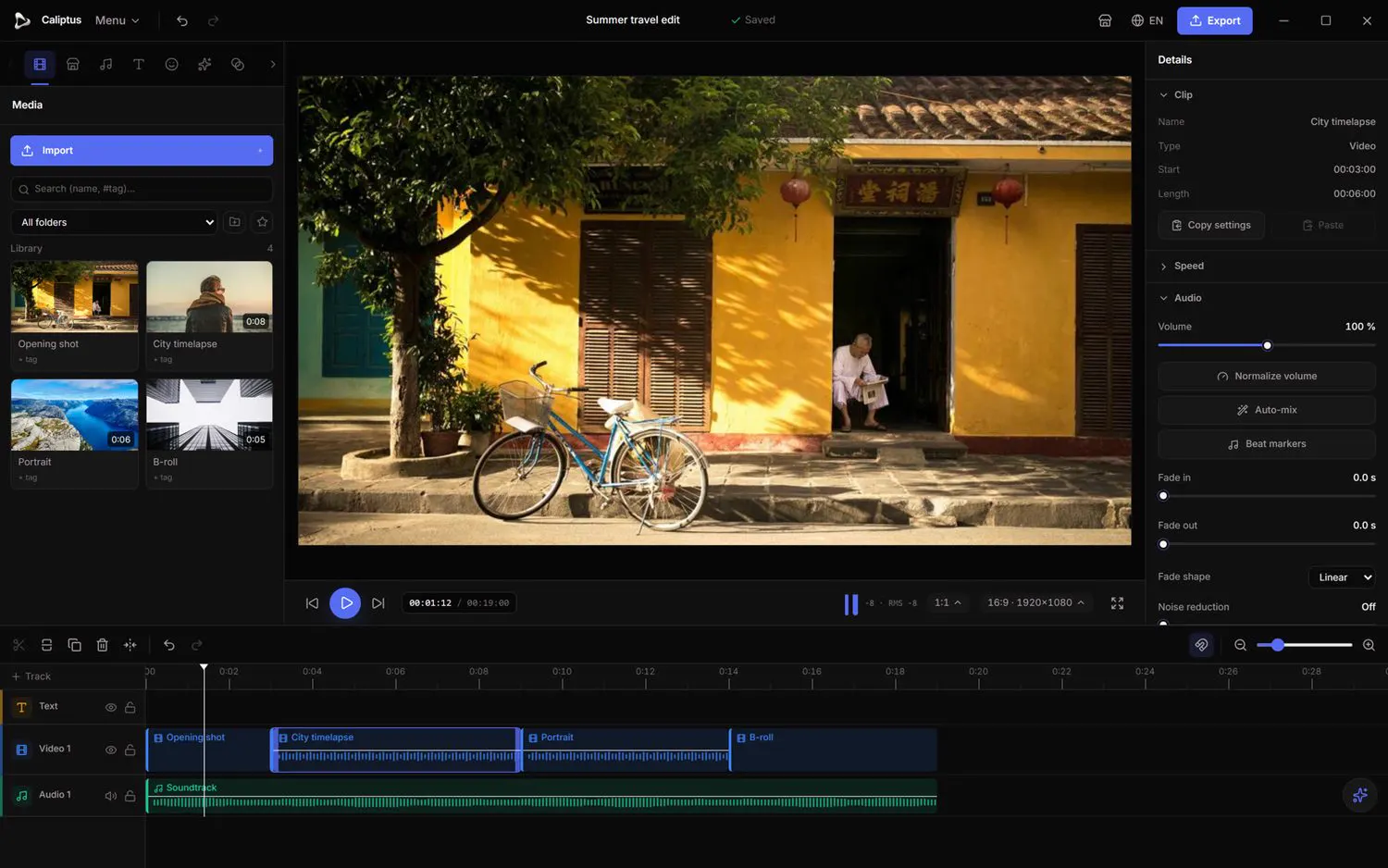
Tool rail Media, audio, text, effects, transitions and marketplace, one click away.
Editing should feel immediate.
The real Caliptus interface, on a demo image (Unsplash).
Find the look. Then make it yours.
Drag the slider: same shot, before and after “Teal & orange”.
- Curves
- Scopes
- Color wheels
Powerful AI. Your footage never leaves.
100% on-device: no video is ever sent to a server
Automatic short format
Turn a long clip into a vertical short in one pass: reframed, silences cut and subtitles added.
Auto-reframe
Keeps the subject in frame when you change aspect ratio, ideal for turning wide footage vertical.
AI mask and cutout
Isolate a subject without a green screen: track it across the whole shot or drop the background entirely.
Smart stabilization
Smooths out camera shake automatically, computed in the background while you keep editing.
Your videos belong on your computer
- Your files
- Caliptus
- Export
Edit without an account
The editor, effects and local AI work without an account.
A free account to export
It is required to export and to publish on the marketplace. No payment.
Offline export
Export works offline for 14 days after your last sign-in.
Local processing
Media, editing, export and AI are processed on your machine.
One editor. Every story.
Your editor grows with its creators.
Community LUTs, presets and templates, installed in one click from the editor.
Free.Really.
€0 Forever.
- Full editor
- Local AI
- Effects
- Color tools
- Subtitles
- Export without watermark
- Community marketplace
No trial. No premium editing tier. No subscription.
Frequently asked questions
The fundamentals about Caliptus, in one place.
Is Caliptus free?
Yes. Caliptus is completely free: its editing tools, effects, AI features and export are all available at no cost.
Are my videos uploaded to a server?
No. Importing, editing, effects and export all run locally on your machine. Your footage never leaves your device.
Do I need an account?
Not to edit: the editor, the local AI and your projects work without an account. A free account is required to export; it also lets your settings follow you across the app and the website. All processing stays on your device.
Does Caliptus work offline?
Yes. Editing and the local AI work without a connection. Export also works offline for 14 days after you last signed in; after that, just sign in again.
Do the AI features send my data to the cloud?
No. The AI tools, from automatic subtitles to reframing and background removal, run entirely on your machine. Nothing is sent to a server.
Which formats can I import and export?
You can import common video, image and audio files, and export MP4 (H.264/AAC), broadly compatible with modern platforms and devices.
What is the marketplace?
A free community library of LUTs and presets you can install in one click, apply to any clip, and share with others.
When will Caliptus be available?
Caliptus is actively in development. This site is updated as soon as a sufficiently stable version is ready to download.
 Coming soon
Your next edit starts here.
A fast, private creative studio built to stay on your machine.
Planned platforms : Windows · Linux
- Download Caliptus
- Import your files
- Export without a watermark